
How to fix low audience retention on YouTube
How to fix low audience retention on YouTube
Let us sit down and tell ourselves the truth for a second. You know that feeling when you finally get a 10% Click-Through Rate (CTR) on a video and you think, "Yes, this is the one!" only to check your analytics two days later and realize everyone clicked off after 30 seconds? It hurts.
Listen, getting someone to click your thumbnail is half the battle. If they do not actually stay to watch the video, the YouTube algorithm is going to bury your content. YouTube does not just care about clicks; the platform cares about watch time. Specifically, it looks at your audience retention, which is the actual percentage of your video that people sit through. If you want to scale your YouTube channel and make actual money, you have to stop staring at your view count and start studying your audience retention curves.
There are times I check my YouTube Analytics only to realize that every video I publish is not one big project but a series of tiny moments where I either win or lose my viewers' attention.
I promise you understanding these graphs is not just for data scientists or corporate guys. It is the core foundation for anyone who wants to treat their YouTube channel like a real monetized business. So let us break down what that audience retention curve is telling you and how we can use it to completely re-engineer the way you script and edit your videos.
1. The Anatomy of a Retention Curve: What Are You Looking At?
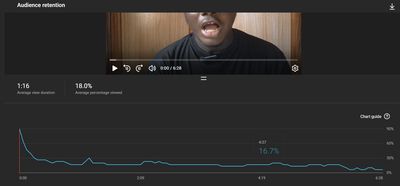
When you open up YouTube Studio and look at that retention graph, it is basically a map of attention. It shows you where your viewers are locked in and exactly where they got bored and left. A healthy curve does not happen by accident. If we break it down, there are four things you need to watch out for:
- The Intro Drop-Off (The First 30 Seconds): This is where the heaviest damage happens. Look, it is completely normal to see a sharp dip at the beginning as casual scrollers leave. If your curve drops below 50% or 60% in those first 30 seconds, it means your intro is failing to deliver what your thumbnail promised. We need to fix that.
- The Flat Line (The Sweet Spot): This is the dream. When you see a horizontal line, it means your audience is fully locked in. Nobody is skipping; nobody is leaving. They are absorbing what you are saying.
- The Spikes (The Re-watch Indicator): If you see a bump upwards in the middle of your curve, it means people actually scrolled back to re-watch that specific part. Usually, this happens when you drop a high-value tutorial step, a great on-screen graphic, or even just a genuinely funny moment.
- The Dips (The Skip Indicator): A downward slope in the middle of your video? That is your audience telling you they are actively skipping forward or just closing the app. It is a sign that whatever you were talking about right there was dragging, repetitive, or just boring.
2. Diagnosing and Fixing the "Intro Bleed"
Think about it like this: the first 30 seconds of your video dictate its future. If you lose your viewers here, the rest of your work does not even matter.
I see many creators killing their retention by starting with a massive 20-second cinematic logo animation or doing that slow, repetitive greeting: "Hey guys, welcome back to my channel. If you are new here please subscribe, hit the bell..." Bro, nobody cares yet. You have not given them a reason to care.
After years of experience in strategy and building actual tools, the way I view content has drastically changed. The modern Gen-Z attention span is ruthless. The rise of short-form content has made an impact on how long viewers will tolerate a slow video. That is why as a creator, getting straight to the point is now mandatory. The first 5 seconds are crucial if you want to hold onto that audience retention.
Here is the fix: Use what we call the "Hook-and-Payoff" structure. In the first 5 seconds, visually and verbally confirm that the viewer clicked the right video. State the problem, show a flash of the solution, and then get straight into the value. Save the channel introductions for much later.
3. Keeping the Pacing Sharp: How to Flatten Your Curve
Okay, so you survived the intro. Now your only job is to keep that retention line as flat as possible. Every time your video gets quiet, slow, or too predictable, that line is going to dip.
- Pattern Interrupts: The human brain gets bored fast. To keep your viewers engaged, you need to change things up every 10 to 15 seconds. I do not mean adding chaotic animations. It can be as simple as changing the camera angle, zooming in slightly, cutting to some B-roll, or throwing some bold text on the screen. Keep their eyes moving.
- Open Loops: You have to keep them anticipating what is coming next. Use transition phrases like: "Now that we have calculated this first metric, we need to apply it to the main formula, which I will show you in a second. First, we need to look at..." This creates a loop. They have to keep watching to get the answer.
- Look at the Data: Do not just guess if your pacing is too slow. Keep an eye on your YouTube Studio analytics. More importantly, understand the financial impact of your pacing. A higher retention rate means YouTube can place mid-roll ads in your video. You can jump over to the Income Calculator on TubeUtility to run the numbers and see how boosting your retention and ad impressions can scale your monthly AdSense revenue.
⏱️ My Personal Script Pacing Checklist
(Run your scripts through this before you even touch your camera. It saves much time in the edit.)
- 0:00 - 0:30 (The Hook): Tell them the problem clearly. Show a quick glimpse of the final payoff. Eliminate all filler phrases.
- 0:30 - 2:00 (The Setup): Jump directly into the first major high-value point without long introductions.
- Every 60 Seconds: Give them a micro-payoff. Introduce a quick win, a sharp data point, or a clean visual shift to reset attention.
- The Outro: Never say "In conclusion" or wrap up slowly. Deliver your final point and cut straight to the end screen to save your retention score.
4. Let’s Answer Some Frequently Asked Questions
You guys ask me about this stuff all the time so let us clear up some common questions:
- Q: Seriously though, what is a good audience retention percentage?
A: If you are making an 8-to-12-minute video, hitting a 40% to 50% retention rate is highly successful. That will usually signal the algorithm to start pushing your stuff. If you can push it past 60%, you are in viral territory. - Q: Why does my retention curve suddenly spike at the end of the video?
A: This happens a lot when you hide an anticipated answer or a big reveal at the very end. People get impatient and skip the middle just to see the result. The spike looks cool, but the massive dip right before it is actually hurting your overall watch time. It is better to spread the value throughout the video. - Q: If I get a high retention rate, will my video automatically go viral?
A: Not necessarily. YouTube looks at the combination of Click-Through Rate and Average View Duration. If your thumbnail is not great, a 70% retention rate will not help because nobody is clicking in the first place. You need both engines running. - Q: How do I handle brand sponsorships without everyone skipping and ruining my retention?
A: We all know people skip ads. To minimize the damage, do not use pre-packaged corporate slides. Integrate the sponsor into your actual workflow, keep your energy up, and put helpful text on the screen so the viewer feels like they are still learning something while you do the read.
5. Wrapping It Up: Respect the Viewer’s Time
Let us stop guessing what works. Dive into your analytics, see exactly where your audience is getting bored, and fix the leaks. Once you get those retention numbers up, use the calculators we built at TubeUtility to project your new income and negotiate better brand deals. Let us start treating our YouTube channels like the performing businesses they are. This keeps the flow intact while driving traffic to the actual frontend calculators you have live right now.
🚀 Next Step in Your Creator Workflow
To see how a higher retention rate directly impacts your backend ad revenue, use our free processing tools. Open the All-In-One Revenue Calculator right now to project your monthly updates based on your optimized view duration patterns.